
Upload a single-object STL or 3MF (up to 80 MB) or start from one of 15 built-in models. Put a logo on one flat face and a name, a serial number or a second logo on the other, check it in a live 3D preview, and 4B Engraver cuts it into the model. You get back a watertight 3MF and an STL for your slicer. No CAD knowledge required.
A worked example: a name on a phone stand
We took one of the 15 built-in models, the iPhone desk stand (84 × 100 mm base, 66.6 mm tall), and engraved the word Hello on its front deck and the 4B logo on its base. The screenshots were taken on 10 October 2026, and the numbered marks are ours. The first two were taken again later that day, after the engraver’s note on logo formats and its note on what the 3MF contains were corrected.
1. Pick a model, or upload your own
The built-in models are ready to print and include cable winders, desk stands, charging trays, tags and labels. Your own model can be an STL or 3MF of up to 80 MB with a flat top or bottom face; the engraving always goes on those two faces.
2. Put the name on the face you will see
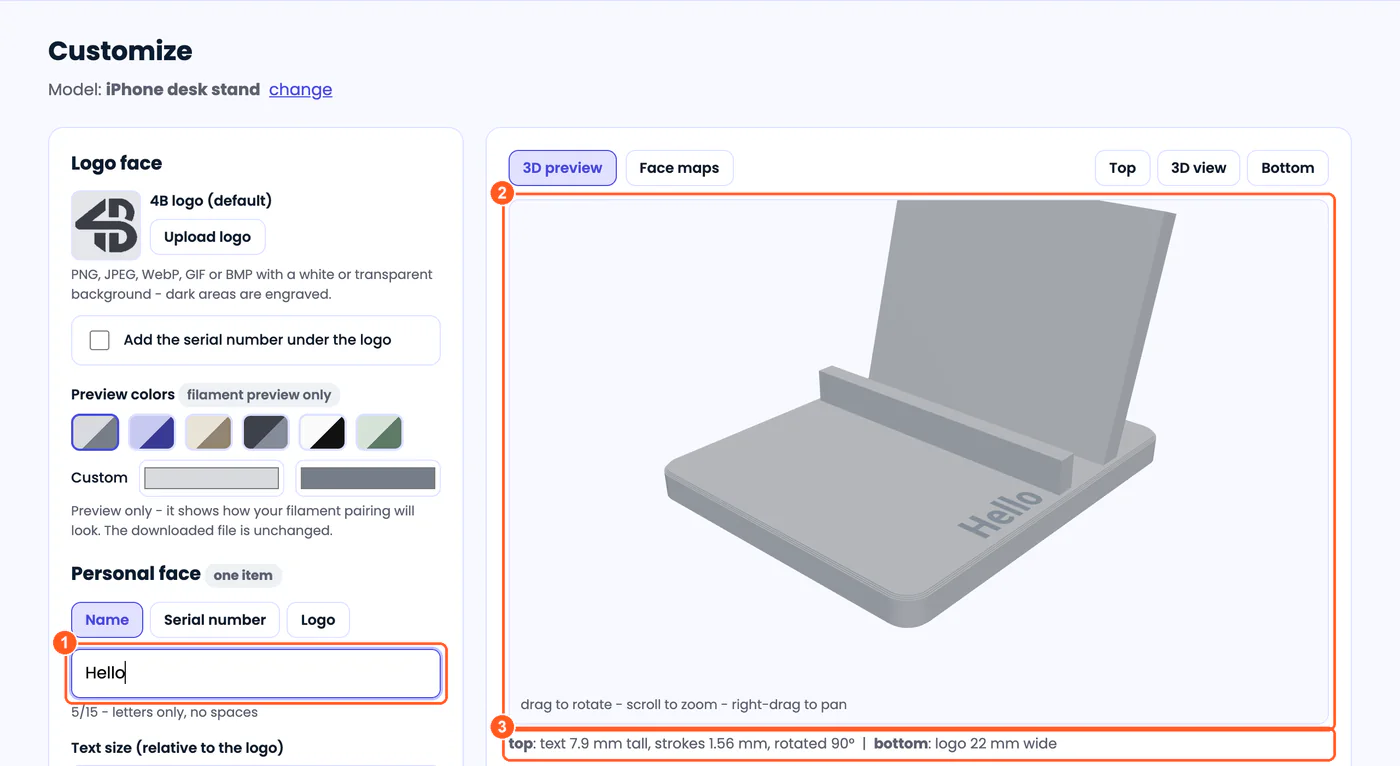
- Mark 1: The name: letters only, no spaces, up to 15 of them.
- Mark 2: A live 3D preview of the engraving on the actual model. Drag to turn it.
- Mark 3: The sizes the tool chose to fit the flat area: text 7.9 mm tall with 1.56 mm strokes on the top face, the logo 22 mm wide on the bottom.
One face carries the logo and the other carries one personal item: a name, a serial number or a second logo. By default the name goes on the bottom face, which on this stand is the underside, so we set “Which face is the personal face?” to the top face. The logo moved to the base. With orientation on Auto, the tool turned the word 90° to run along the deck’s longest clear strip; its own hint says this is usually the biggest gain in letter size. The serial number under the logo was switched off for this example.
3. Choose the depth and generate
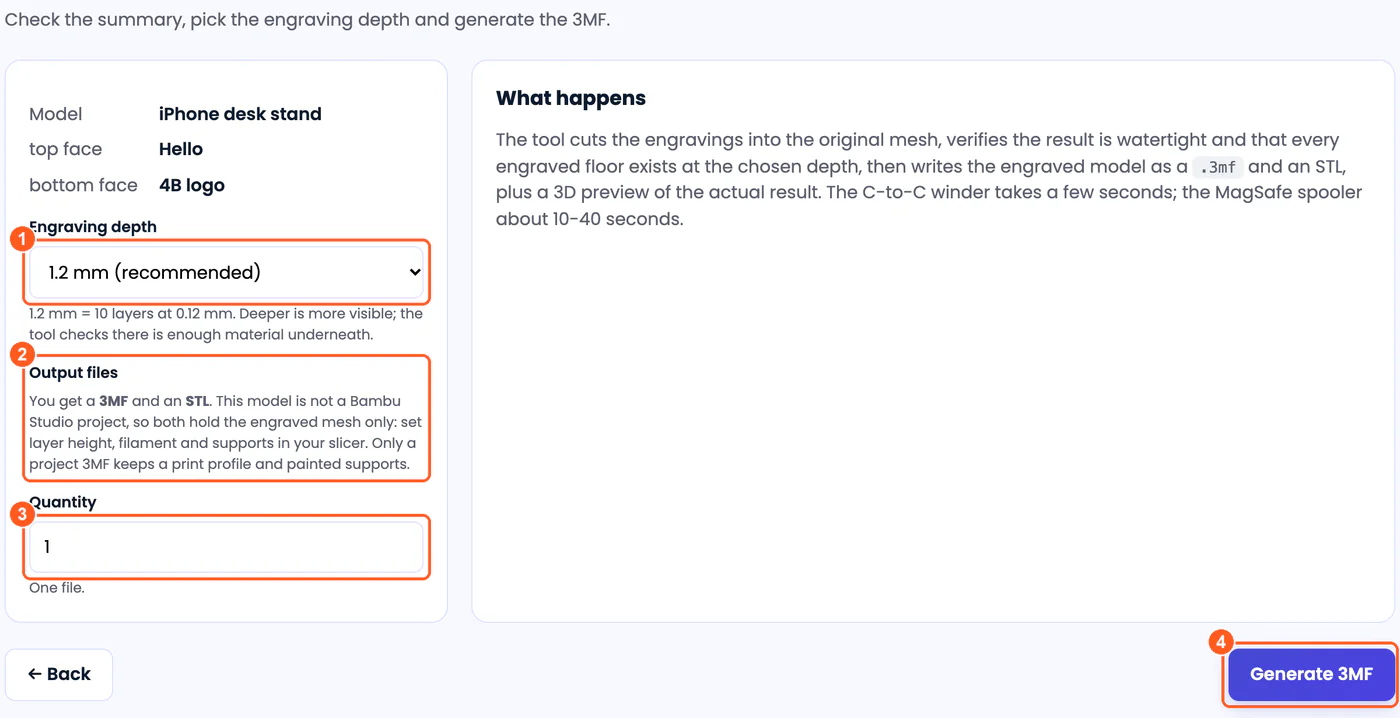
- Mark 1: Depth from 0.6 to 2.0 mm. The recommended 1.2 mm is 10 layers at 0.12 mm, and the tool checks there is enough material under the engraving.
- Mark 2: What you will get. This stand is an STL model, so the 3MF and the STL both hold the engraved mesh only. A 3MF keeps a print profile and painted supports only when the model was a Bambu Studio project 3MF, such as the two cable winders or a project file you upload.
- Mark 3: Quantity. More than one, up to 8, gives a zip of files; with a serial number they are numbered one after another.
- Mark 4: Generate 3MF.
4. Download and check
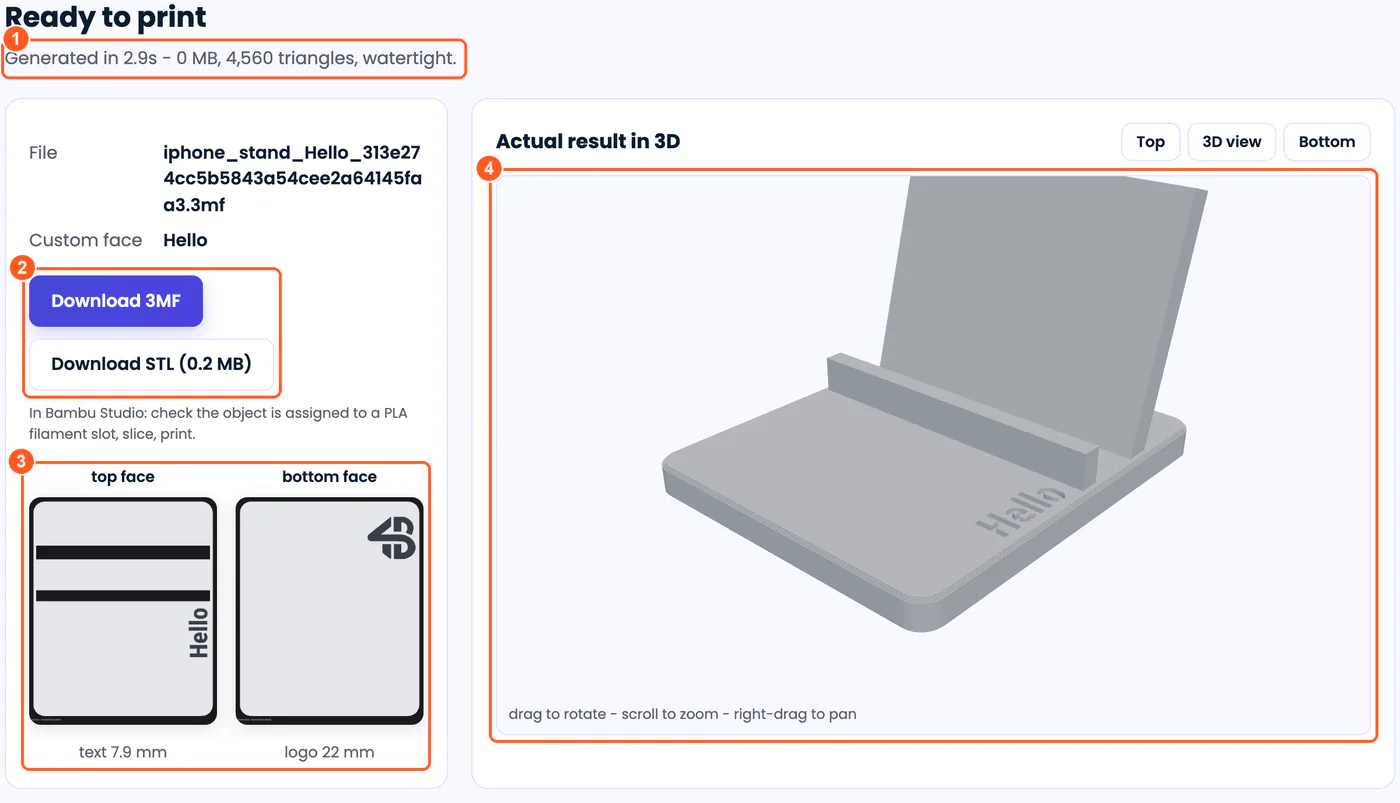
- Mark 1: Generated in 2.9 seconds: 4,560 triangles, checked watertight.
- Mark 2: The result as a 3MF and as an STL (0.2 MB).
- Mark 3: Flat maps of both faces with the size of each engraving.
- Mark 4: The 3D view of the file you download, not of the original model.
We checked the STL ourselves after downloading it. It has 4,560 triangles, every edge is shared by exactly two of them, which is what “watertight” means for a slicer, and it measures 84 × 100 × 66.6 mm, the size of the original stand. The 3MF for this built-in model held the mesh only, with no print settings, so you set the layer height and filament in your slicer as usual.
For the design side, our guides cover preparing a logo so its detail survives and numbering a batch with serial numbers.
Limits and file formats
- Models: STL or 3MF, one object (a 3MF with several objects is refused), up to 80 MB, with a flat top or bottom face. Very detailed meshes, above about 2.2 million triangles, are refused.
- Two faces: the logo face and one personal item on the other face. Everything is scaled to fit the flat area, and the preview says whether it fits.
- Logos: PNG, JPEG, WebP, GIF or BMP, dark on a white or transparent background; the dark areas are engraved. An Invert option handles a light logo on a dark background.
- Names of up to 15 letters. Serial numbers up to 999,999, with a prefix of up to six letters or digits, engraved with at least four digits (4B-0042).
- Depth: 0.6, 0.9, 1.2, 1.5 or 2.0 mm.
- Output: a 3MF and an STL for every result. The 3MF keeps a print profile and painted supports only when the model was a Bambu Studio project 3MF; from an STL it holds the mesh only. A batch of up to 8 numbered parts comes as one zip with both files for each part. The preview colours only show how a filament pairing might look; they do not change the file.
- Time: seconds for a small model like this one; the tool itself says about 10 to 40 seconds for its MagSafe cable spooler.
- Privacy: models are processed on our server and deleted after 7 days. There is no account.